
Gaming PCs have always been about more than frame rates.
For many builders, the case itself is part of the experience. Tempered glass panels, RGB lighting, custom water cooling, vertical GPUs, LCD screens, and themed cable work have turned the modern gaming PC into a display piece.
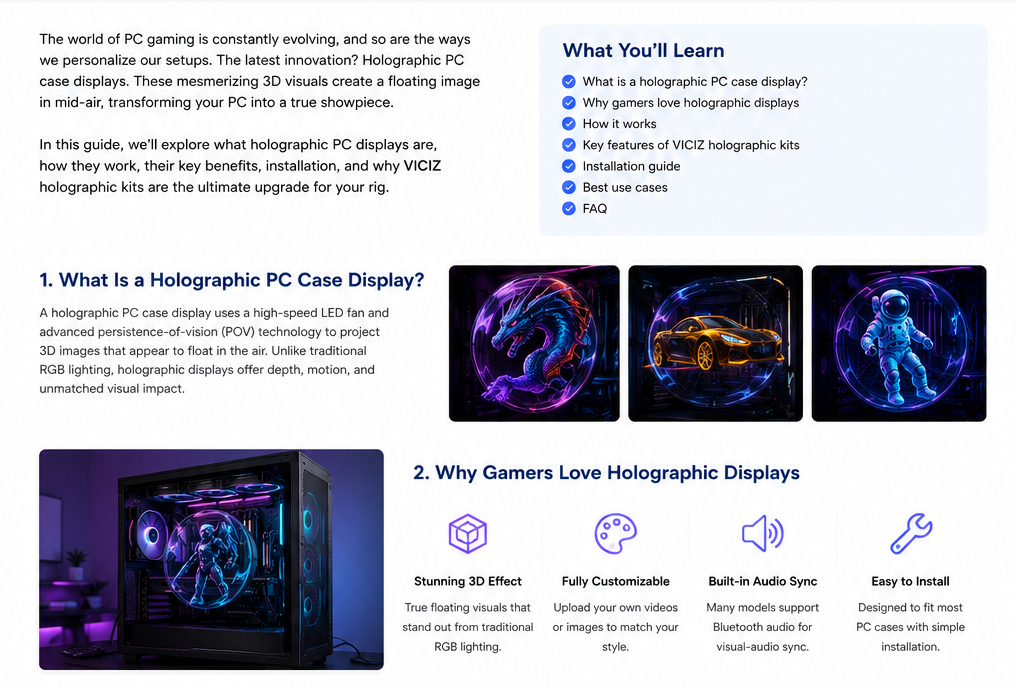
A PC case visual display kit takes that idea in a different direction: instead of adding another flat screen inside the chassis, it creates the illusion of animated objects floating in the PC.
A weapon inspection animation can appear to sit between the GPU and side panel. A game character can lunge toward the viewer. A blade can sweep across the case with apparent depth. When the content is designed correctly, the effect feels less like watching a video and more like seeing a moving object suspended inside the computer.
That difference is what makes visual PC mods interesting.
What Is a PC Case Visual Display Kit?
The term “PC case visual display kit” is commonly used for compact rotating LED displays installed inside or around a gaming PC.
Technically, these systems are different from volumetric optical displays created by recording and reconstructing light wavefronts. Rotating LED displays use precisely timed LEDs and rapid motion to create a persistence-of-vision effect that the eye perceives as a continuous floating image. Research on rotating and swept-volume displays describes this same use of retinal persistence for creating continuous visual forms from rapidly moving illuminated elements.
For a PC builder, the practical result is more important than the terminology: the background can visually disappear while the bright subject appears to float inside the case.
That makes the technology particularly well suited to transparent gaming PCs, where the physical hardware behind the display becomes part of the illusion.
Why Visual Displays Work So Well Inside Gaming PCs
A traditional internal LCD adds information or artwork, but it is still obviously a rectangular screen.
A visual display behaves differently.
When the source content uses a pure black background, the dark area contributes little visible light. The illuminated character, weapon, logo, or animation remains prominent, giving the impression that the subject exists independently inside the chassis.
This works especially well with gaming imagery because games already use exaggerated perspective, weapon inspections, melee attacks, projectiles, character abilities, and dramatic lighting.
In our own VICIZ content testing, the strongest visuals are not necessarily the most complicated ones. Simple compositions often look more convincing.
A first-person hand holding one recognizable weapon can create a stronger illusion than a scene filled with particles, scenery, multiple characters, and visual effects.
The reason is clarity.
The viewer immediately understands what the object is, where it sits in space, and how it is moving.
The Best Content for a PC Case Volumetric Display
The display hardware matters, but content design has an equally large impact on the final result.
A normal game clip is usually not ideal. It contains environments, UI elements, shadows, textures, and camera movement that were designed for a monitor rather than for a floating display.
For visual PC content, we have found several principles consistently produce better results.
1. Use a Pure Black Background
The subject should be isolated against true black.
Avoid floors, rooms, walls, battlefields, smoke-filled backgrounds, or faint gray scenery. Even dark environmental details can become visible noise once displayed inside a PC.
The goal is simple:
subject visible, background absent.
2. Keep the Main Subject Large but Not Full-Screen
A useful target is approximately 60–70% of the usable frame.
If the subject is too small, it loses impact when viewed through the PC side panel.
If it fills the entire frame, there is not enough negative space to make the object feel suspended.
The black area around the subject is part of the 3D illusion.
3. Create Real Foreground and Background Depth
One of the biggest mistakes in “3D volumetric display” content is relying only on zoom.
Zoom makes an object bigger. It does not necessarily make it feel closer.
Better results come from actual perspective changes.
For example:
- a blade edge passes close to the viewer while the wrist stays farther back;
- a shell casing ejects sideways from a rifle;
- a hand reaches forward while the character’s torso remains behind it;
- a mechanical weapon unfolds along the depth axis.
These relationships create a much stronger naked-eye 3D impression.
4. Use Recognizable Actions
Gaming audiences understand certain movements immediately.
Weapon inspections are a good example.
A player does not need an explanation when they see a hand flipping a knife, cycling a weapon, opening a cylinder, loading shells, or locking a mechanical component.
That instant recognition matters in short-form content and also makes the PC display itself easier to understand.
The visual tells a story before the viewer has time to ask what they are looking at.
5. Design Motion Effects Around the Object
Not every weapon needs the same glowing arc.
A blade can use a short edge-attached reflection.
A heavy tool can use positional afterimages that communicate weight.
A firearm can use mechanical reflections, recoil, casing ejection, and a compact forward muzzle event.
A folding mechanism can use segmented activation light around its hinges.
When the effect follows the physics of the object, the animation feels intentional rather than decorative.
Why Some Visual PC Videos Look Better Than Others
A high-resolution source file does not automatically create a convincing visual result.
The actual PC environment changes what the viewer sees.
RGB fans, RAM lighting, illuminated GPU logos, cables, reflective glass, and other bright components remain physically behind the floating image. That means extremely dark weapons or dark clothing can visually disappear into the case.
This is why content designed specifically for a visual gaming PC often uses:
- stronger mid-tone colors;
- larger material blocks;
- cleaner silhouettes;
- fewer tiny engravings;
- controlled metallic reflections;
- limited particle effects;
- strong separation between the object and the PC lighting.
Fine detail that looks impressive on a 4K monitor can become visual noise when reproduced by a moving LED display and then viewed through tempered glass.
For this use case, readability beats complexity.
What Makes a Good PC Case Visual Display Kit?
If you are comparing PC volumetric display products, do not evaluate only the promotional demo.
Look at how the system performs inside a real gaming PC.
Several factors matter.
Image Clarity
Weapons, faces, hands, and small mechanical parts should remain identifiable at normal viewing distance.
Poor image reproduction can turn fine edges into broken light patterns.
Noise
Because the display contains a moving mechanism, acoustic performance matters in a desktop PC.
A gaming setup may already contain multiple case fans, radiator fans, a pump, and GPU cooling. Adding another noticeably loud component can reduce the overall quality of the build.
Mounting Compatibility
The installation system should work with common PC layouts without interfering with the graphics card, radiator, cooling tubes, cables, or side panel.
Measure before installation.
A good-looking modification is not useful if it compromises cooling or component clearance.
Content Upload and Customization
The most interesting part of this technology is not displaying one preloaded animation.
It is being able to change the PC’s identity.
One day the system can display a futuristic weapon inspection. The next it can show an anime-inspired character, an energy creature, a logo animation, or a custom visual created specifically for the owner’s build.
For enthusiasts, content flexibility is one of the biggest advantages over conventional decorative lighting.
Visual Display vs. LCD Screen Inside a PC
Both can improve the appearance of a gaming PC, but they create different experiences.
An internal LCD is better when you want to show:
- temperatures;
- hardware monitoring data;
- wallpapers;
- system information;
- conventional video.
A PC case visual display kit is better when the goal is visual spectacle.
It works best with:
- floating game characters;
- first-person weapon animations;
- melee attacks;
- 3D logos;
- mechanical transformations;
- short looping animations;
- themed gaming effects.
An LCD behaves like a display.
A PC volumetric display is closer to a visual illusion.
There is room for both approaches, and some enthusiast builds may eventually combine them.
How to Make a Visual Gaming PC Look Better
If you are planning a build around a visual display, consider the PC lighting as part of the composition.
For example, a cyan-heavy case can reduce contrast with a cyan volumetric display. A purple PC may make violet characters less distinct.
Instead of matching every color, use complementary contrast.
A cyan PC can pair well with warm copper, orange, red, or sand-colored visual subjects.
A purple PC can benefit from emerald, teal, warm gold, or controlled orange accents.
A green PC can make magenta, violet, silver, or red subjects stand out.
The display content and RGB system should work together rather than compete for attention.
Is a Visual PC Mod Worth It?
For someone building a purely performance-focused computer, it is obviously not necessary.
For a PC enthusiast who treats the computer as part of the room, desk setup, streaming background, or personal brand, it can be a very different kind of upgrade.
The strongest use case is not “more RGB.”
It is customization.
A visual display gives the PC a moving visual identity that can change without rebuilding the hardware.
That makes it particularly interesting for:
- gaming setup enthusiasts;
- PC modders;
- streamers;
- content creators;
- esports rooms;
- show PCs;
- themed builds;
- PC retailers and exhibition systems.
Final Thoughts
The most convincing visual gaming PCs are not the ones with the most effects.
They are the ones where the hardware, lighting, animation, and perspective work together.
Start with a clean black background. Use one strong subject. Create real foreground depth. Keep the silhouette readable. Use motion that makes sense for the object. And design the animation for the PC case rather than simply importing a normal game clip.
That is where a PC case visual display kit stops feeling like another RGB accessory and starts becoming part of the build itself.
At VICIZ, we are continuing to test different first-person weapon animations, character attacks, materials, lighting combinations, and motion styles specifically for visual gaming PC installations.
The goal is simple:
make the PC look like something is actually happening inside it.